 |
|
Please Whitelist This Site?
I know everyone hates ads. But please understand that I am providing premium content for free that takes hundreds of hours of time to research and write. I don't want to go to a pay-only model like some sites, but when more and more people block ads, I end up working for free. And I have a family to support, just like you. :)
If you like The TCP/IP Guide, please consider the download version. It's priced very economically and you can read all of it in a convenient format without ads.
If you want to use this site for free, I'd be grateful if you could add the site to the whitelist for Adblock. To do so, just open the Adblock menu and select "Disable on tcpipguide.com". Or go to the Tools menu and select "Adblock Plus Preferences...". Then click "Add Filter..." at the bottom, and add this string: "@@||tcpipguide.com^$document". Then just click OK.
Thanks for your understanding!
Sincerely, Charles Kozierok
Author and Publisher, The TCP/IP Guide

|
|
|

Custom Search
|

|


DNS Domains and the DNS Hierarchical Name Architecture
(Page 2 of 3)
The DNS Hierarchical Tree Structure of Names
One could construct a tree diagram with the United Nations on top with lines pointing to each of the countries on earth. Then, within the United States, for example, we could draw lines to each of the states; within each state, lines to each county and so on. The result would be something that looks like an upside-down tree, as we can see in Figure 235. This is called a tree structure.
|
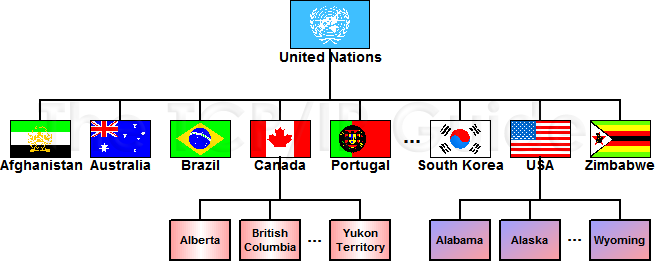
Trees are used all over computing and networking; for example, trees are a type of LAN topology. For our purposes in explaining DNS, the best example of a tree structure is the directory tree used to store files on a computer's hard disk or other storage devices. The root directory is at the top of the structure and may contain named files and/or named directories. Each directory can itself contain individual files or subdirectories, which can in turn contain their own subdirectories, and so on.
The domain name structure in DNS is conceptually arranged in exactly the same way, only instead of dealing with files, DNS deals with named objects, usually devices like IP hosts. The highest level is still the root of the tree. It contains a number of domains, each of which can contain individual objects (names) and/or lower-level domains. Lower-level domains can in turn have still lower-level domains, allowing the tree as a whole to take on an arbitrary structure.
|
| |||||||||||||||||||
Home - Table Of Contents - Contact Us
The TCP/IP Guide (http://www.TCPIPGuide.com)
Version 3.0 - Version Date: September 20, 2005
© Copyright 2001-2005 Charles M. Kozierok. All Rights Reserved.
Not responsible for any loss resulting from the use of this site.