 |
|
Please Whitelist This Site?
I know everyone hates ads. But please understand that I am providing premium content for free that takes hundreds of hours of time to research and write. I don't want to go to a pay-only model like some sites, but when more and more people block ads, I end up working for free. And I have a family to support, just like you. :)
If you like The TCP/IP Guide, please consider the download version. It's priced very economically and you can read all of it in a convenient format without ads.
If you want to use this site for free, I'd be grateful if you could add the site to the whitelist for Adblock. To do so, just open the Adblock menu and select "Disable on tcpipguide.com". Or go to the Tools menu and select "Adblock Plus Preferences...". Then click "Add Filter..." at the bottom, and add this string: "@@||tcpipguide.com^$document". Then just click OK.
Thanks for your understanding!
Sincerely, Charles Kozierok
Author and Publisher, The TCP/IP Guide

|
|
|

Custom Search
|

|


IP Custom Subnet Masks
(Page 3 of 4)
Determining the Custom Subnet Mask
Once we have determined how many bits we are going to devote to the subnet ID and the host ID, we can figure out the subnet mask. This is fairly easy to do, now that we understand how subnetting works. We begin with the default subnet mask in binary for the appropriate class of our network. We then start with the left-most zero in that mask and change as many bits to 1 as we have dedicated to the subnet ID. We can then express the subnet mask in dotted decimal form. Figure 69 shows how the custom subnet mask can be determined for each of the subnetting options of a Class C network, in both binary and decimal.
|
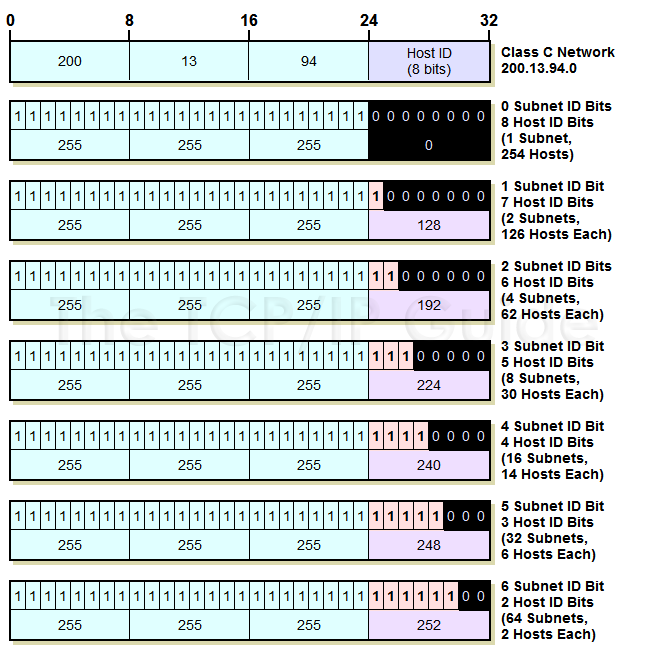
So, to take the example in that figure, consider the Class C network 200.13.94.0. There are 8 bits in the original host ID, which gives us six different subnetting options (we can’t use 7 or 8 bits for the subnet ID, for reasons we will discuss shortly.) Suppose we use three of these for the subnet ID and five are left for the host ID. To determine the custom subnet mask, we start with the Class C default subnet mask:
11111111 11111111 11111111 00000000
We then change the first three zeroes to ones, to get the custom subnet mask:
11111111 11111111 11111111 11100000
In dotted decimal format, this is 255.255.255.224.
|
 Key Concept: Once the choice of how to subnet has been made, the custom subnet mask is determined simply, by starting with the default subnet mask for the network and changing each subnet ID bit from a 0 to a 1.
|
| |||||||||||||||||||
Home - Table Of Contents - Contact Us
The TCP/IP Guide (http://www.TCPIPGuide.com)
Version 3.0 - Version Date: September 20, 2005
© Copyright 2001-2005 Charles M. Kozierok. All Rights Reserved.
Not responsible for any loss resulting from the use of this site.